The CMS media module allows you to upload media to the web server, then use that media in blog posts, or any other pages on the site.
In a previous post, we showed the Media Picker Client. Here, we cover managing the uploaded media, the API and how to add mime types to the system.
Media Management UI
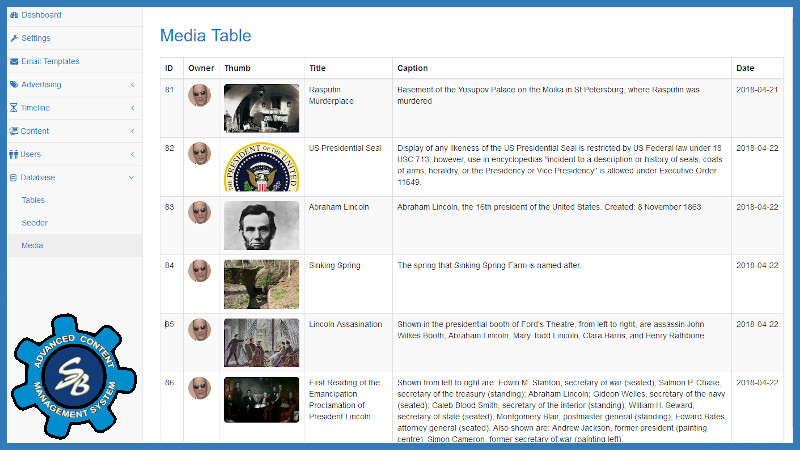
In the admin area of the CMS, select Database → Media to pull up the table shown. It lists all
the images that have been uploaded to the server, along with the meta data — id, title,
caption, upload date and attribution — associated with each image, along with a thumbnail view.
Click any where in the row to launch a dialog to edit the meta data and/or replace the image. If you click on the thumbnail you will see the full sized image.
Supported MIME types
It currently supports the following extensions:
jpgpnggifwebp
To add more extensions, it is critical that you update these files:
~~cms/media/ci/config/mimes.php- ensure the desired extension is included~~cms/media/ci/db/Mmedia- append to both$media_typesarray at top of the file, and the$config['allowed_types']in thefunction upload_to~~ubow/ci/assets/js/UBOW.js- append the type toconst MTYPESarray~~ubow/ci/helpers/general_helper.php- append to the$mtypesarray infunction imgSrc
There are several concerns that must be addressed:
- File Size - we don't want huge files to be uploaded
- Server Permissions - the server must be configured to allow the web server to write the files
- Permissions - we don't want just anybody to have the ability to upload files to our machine
- Attribution - we need a way to acknowledge the author/owner of each uploaded file